
Turbo Soccer Wiki
The unofficial handbook for Roblox car soccer Beta 1.0.
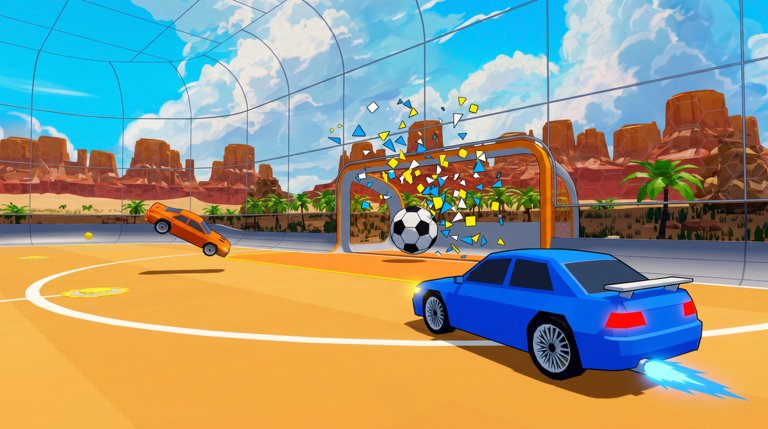
Turbo Soccer : Beta 1.0 - Car Soccer is a free Roblox sports experience by zDashi where players drive cars, boost, flip, and score in competitive arenas. Since entering early access on 19 September 2026, it has drawn about 7M+ total visits by an October 2026 snapshot, plus large concurrent player counts, by blending Rocket League-style physics fantasy with Roblox-friendly queues, mobile support, and cosmetic progression.
This overview page orients new visitors. Deep tutorials live under the guides hub. For live patch chatter and promo drops, join the community Discord: discord.com/invite/mTVSZ9Qxtm.
Core fantasy
You are not a walking avatar with a ball glued to your feet. You are a car. Momentum, boost tanks, jump timing, and camera discipline decide whether a fifty-fifty becomes a goal or an own-goal. That fantasy explains why players search for controls, kickoffs, aerials and boost, and ranked help within days of installing.
Platforms and controls
- PC: WASD + mouse
- Mobile: on-screen controls — see mobile tips
- Console: compatible controllers
- Server size: up to 20 players depending on mode configuration
Details and drills: controls guide.
Progression systems
| System | Purpose | Wiki link |
|---|---|---|
| Matches | Compete and earn rewards | Getting Started |
| Credits | Buy unlocks | Garage |
| Packs | RNG cars and cosmetics | Codes via Settings → Codes |
| Cars | Hitbox performance | Tier list |
| Cosmetics | Style | Cosmetics |
| Courses / missions | Skill challenges | Practice checklist |
| Leaderboards | Ranked prestige | Ranked |
| Community | Patch notes & drops | Discord invite |
Snapshot facts (October 2026)
- Early-access Beta 1.0 on Roblox since 19 September 2026
- Roughly 7M+ total visits on the public experience counter
- Active promo code PACK — redeem path documented on how to redeem
- Expired community string Discord is no longer redeemable; use the invite link above instead of that old code
- Patch habits and adaptation checklist: updates hub
Why this wiki exists
Players need durable answers for:
- Working promo codes and Settings → Codes redeem steps
- Platform controls that feel different on phone versus PC
- Car choices that are not just “whatever pack opened”
- Scoring, kickoffs, and aerial habits that survive beta patches
- Honest script risk notes instead of miracle claims on scripts
How to use the site
- Claim rewards on codes through lobby Settings → Codes.
- Learn inputs on controls (and mobile tips on phone).
- Follow Getting Started.
- Pick a car via tier list.
- Warm up with the practice checklist, including a few kickoffs.
- Climb using ranked.
- Recheck updates after patches and watch Discord for drops.
Unofficial status
turbosoccer.wiki is a fan resource. It is not affiliated with Roblox Corporation or zDashi. For authoritative patch text, always verify in-game news, creator channels, and the community Discord invite above. The updates hub tracks how to adapt when notes are thin.
Related reading
Browse the guides hub for every tutorial, jump into how to score if you already understand the lobby, or redeem PACK from the codes hub before your next queue.
Frequently Asked Questions
Quick answers for Turbo Soccer players.
What is Turbo Soccer?
A Roblox Beta 1.0 car soccer game by zDashi featuring competitive matches, cars, cosmetics, and leaderboards.
How many visits does Turbo Soccer have?
An October 2026 snapshot of the public Roblox counter sat near **7M+** total visits. Counts change daily.
Where is the Turbo Soccer Discord?
Join the community at [discord.com/invite/mTVSZ9Qxtm](https://discord.com/invite/mTVSZ9Qxtm). That invite is separate from the expired **Discord** promo code listed on codes.
Is this the official wiki?
No. This is an unofficial fan wiki. Confirm critical announcements through official channels and Discord.
Where should new players begin?
Start with Getting Started, controls, and redeem **PACK** via **Settings → Codes** on the codes hub.
Does the game support mobile?
Yes. Mobile on-screen controls are part of the official feature set — see mobile tips.